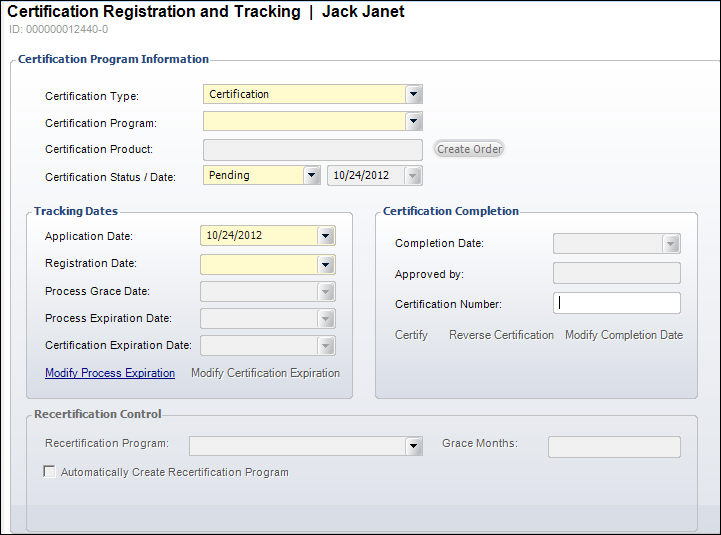
| Screen Element |
Description |
| Certification Type |
Drop-down. The type of certification. For example, Certification
or Recertification. |
| Certification Program |
Drop-down. Select a certification program associated with the
customer. The options on this field are determined by your selection
in the Certification Type drop-down. |
| Certification Status/Date |
Drop-down. The status of the certification program for the
customer. For example, Pending, Expired, or Completed. The date
the status was last modified changes automatically. If your organization
requires an application process, this field should be set to “Under
Review.” When set to Pending, the system automatically calculates
the Process Grace Date if the certification grace months is greater
than zero.
 If a requirement for certification
is that the customer have an active membership, and the membership
is cancelled, the customer has not met the requirement for certification. To
the system, cancelling a membership is like the membership never
happened. This is no different than if a requirement for certification
was that the customer attend a meeting, and then the meeting registration
was cancelled. Personify assumes that if a membership (or
a subscription) is a requirement for certification, the requirement
is that the membership be active for the term of the certification. If
the customer is to get credit for membership, the end
date should be updated for whatever period of time the customer
was a member, the line status should remain as active, and the
line
should be set to "Terminate at End". Therefore,
if a membership is terminated early (i.e., the membership Cycle
End Date is updated to be a date less than the original membership
product Cycle End Date and the Fulfill Status is updated to “T”),
if membership was a requirement for certification, the Certification
Status was "COMPLETED", and if the Certification Expiration
Date is less than or equal to the new membership Cycle End Date
but greater than or equal to the current date, as of 7.4.2 the
Certification Expiration Date will be updated to the new membership
Cycle End Date. If a requirement for certification
is that the customer have an active membership, and the membership
is cancelled, the customer has not met the requirement for certification. To
the system, cancelling a membership is like the membership never
happened. This is no different than if a requirement for certification
was that the customer attend a meeting, and then the meeting registration
was cancelled. Personify assumes that if a membership (or
a subscription) is a requirement for certification, the requirement
is that the membership be active for the term of the certification. If
the customer is to get credit for membership, the end
date should be updated for whatever period of time the customer
was a member, the line status should remain as active, and the
line
should be set to "Terminate at End". Therefore,
if a membership is terminated early (i.e., the membership Cycle
End Date is updated to be a date less than the original membership
product Cycle End Date and the Fulfill Status is updated to “T”),
if membership was a requirement for certification, the Certification
Status was "COMPLETED", and if the Certification Expiration
Date is less than or equal to the new membership Cycle End Date
but greater than or equal to the current date, as of 7.4.2 the
Certification Expiration Date will be updated to the new membership
Cycle End Date.
|
| Create Order |
Button. When clicked, displays the Certification Order Information
screen. This button will only become enabled after the registration
is saved AND if the Require Purchase of Certification Product
checkbox was selected on the Certification Definition screen. |
Tracking Dates |
| Application Date |
Drop-down. The date the certification registration was created.
This date is not visible on the certification requirement record.
If the organization does not require that certification program
registrants first be approved to participate in the program, then
this date will be the same as the Registration Date. |
| Registration Date |
Drop-down. The first day the certification registrant can begin
to complete all requirements for the certification. Requirements
cannot be created until this date is populated. |
| Process Grace Date |
Read-only. Based on the expiration date, this date provides
grace months after the expiration date to complete the certification
requirements. This date populates automatically based on the Certification
Program selected. |
| Process Expiration Date |
Read-only. This is the date by which the registrant must complete
all requirements for the certification. This date populates automatically
based on the Certification Program selected. |
| Certification Expiration Date |
Read-only. The expiration date for the certification. This
is the date the certified customer's certification expires. This
date populates automatically based on the Certification Program
selected.
 When a requirement(s) is met
for a recertification, assuming that the customer has a current
certification, the expiration date of the recertification certification
is set to the expiration date of the current certification plus
the amount of time defined as the length of the certification.
If the customer's certification is expired, then the recertification
expiration date is “X” days from the completion of the requirements. When a requirement(s) is met
for a recertification, assuming that the customer has a current
certification, the expiration date of the recertification certification
is set to the expiration date of the current certification plus
the amount of time defined as the length of the certification.
If the customer's certification is expired, then the recertification
expiration date is “X” days from the completion of the requirements.
|
Certification Completion |
| Completion Date |
Read-only. The date the certification was completed by the
customer. This date populates automatically based on the Certification
Program selected. |
| Approved By |
Read-only. The customer who approved the completed certification
program. This customer name populates automatically based on the
Certification Program selected. |
| Certification Number |
Text box. An optional user-defined field that holds either
a certificate number generated by the organization or a license
number assigned to the customer being certified. |
Recertification Control |
| Recertification Program |
Read-only. If a recertification program was selected from the
Recertification section on the Certification Definition screen,
that program displays here. For more information, please see Defining a Certification
Program. |
| Grace Months |
Read-only. If the certification program was defined with a
certain number of grace months, that number displays here. |
| Automatically Create Recertification Program |
Read-only. If the certification program was defined to automatically
register the customer for the defined recertification program,
this checkbox will be checked. |