Defining Certification Program Prerequisites
The Prerequisite Rules screen allows you to define rules
for how the requirements can be met. Rules can include:
A specific order of requirements. For example,
a person cannot begin the certification process until he/she has a
college degree.
Time frames involved in the entire process
between single prerequisites or groups of prerequisites. For example,
an individual may have to complete the process in 3 years or cannot
take an exam unless three prerequisites are completed.
To define prerequisites:
1. Click
Prerequisite Rules from the
Certification Definitions task category.
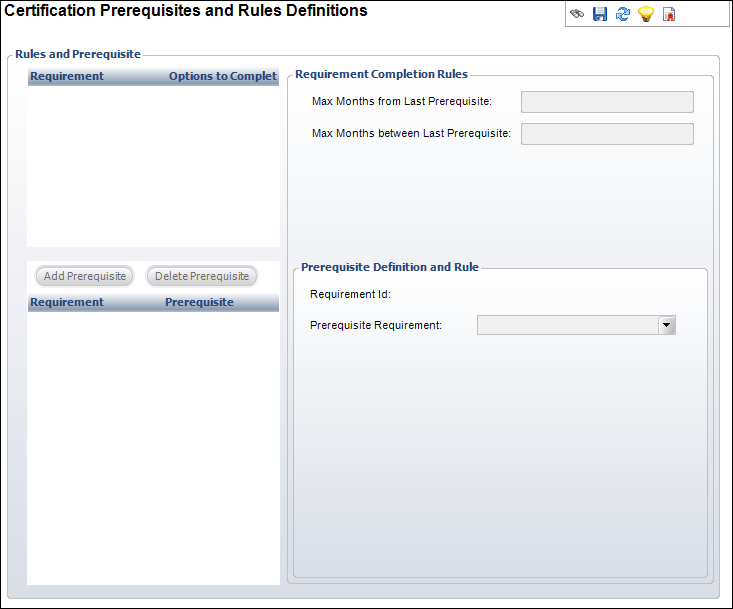
The Prerequisite Rules screen displays, as shown below.
2. Highlight
a requirement in the Rules and Prerequisite table and click Add
Prerequisite.
3. Enter
the Max Months from Last Prerequisite.
4. Enter
the Max Months between Last Prerequisite.
5. Select
the Prerequisite Requirement from
the drop-down.
6. Click
Save.
| Screen Element |
Description |
| Add Prerequisite |
Button. When clicked, the fields are enabled to add a prerequisite
to the highlighted requirement. |
| Delete Prerequisite |
Button. When clicked, the highlighted prerequisite is deleted. |
| Max Months from Last Prerequisite |
Text box. The customer must complete this prerequisite within
this number of months from the last prerequisite accomplished.
The value is only applicable if there are multiple prerequisites
assigned to a requirement that can happen in any order. This defines
the amount of time from the last requirement met and not just
between two specific requirements. |
| Max Months between Last Prerequisite |
Text box. Within a set of prerequisites, the customer must
complete another prerequisite within this period of time. The
maximum amount of time that can pass between any two prerequisites.
Zero indicates there is no rule. |
| Prerequisite Requirement |
Drop-down. Select the requirement that is a prerequisite for
another requirement. It must exist within the same set of requirements
for the current certification program. |
|